Communication drives every workplace forward, yet many teams end up tangled in the very systems meant to help them. Messages pile up across chat windows, email chains drift off in different directions, and Teams overlap with quick hallway conversations, each pulling attention away from the work at hand. Even well-structured offices can feel scattered when too many channels compete at once.
IT teams often bear the weight of this problem more than anyone else. They’re expected to keep every platform running smoothly while answering questions from employees who are already overwhelmed by the constant influx of alerts. Some employees want fewer apps, while others want more features; however, some keep missing calls because their speakers are muted. The responsibility lies with IT, which must support all of it without making the environment heavier than necessary.
Discover how Busylight reduces platform overload and enhances communication efficiency without adding complexity.
The Real Problem: Communication Overload and Fragmented Platforms
Most workplace tools claim to facilitate communication, but instead, they create unnecessary complexity and communication gaps due to fragmentation. When different teams use different communication tools, status signals become inconsistent. Visual cues on their screen or alerts on headsets often lead to unnecessary interruptions.
IT teams usually describe their workday as a constant balancing act. Staff ask for faster responses, managers expect consistent availability, and employees want fewer disruptions. Meanwhile, communication tools accumulate, and notifications fight for attention. A brief message from a coworker can disrupt one’s focus, while muting notifications can cause one to miss the meeting.
How Busylight Streamlines Communication
When there are several fragmented platforms, integrations matter because they bring everything under a single umbrella, allowing the status of one tool to be reflected across others. In environments where platforms differ from team to team, integrations can help pull status directly from the user’s communication software, eliminating the need for IT teams to maintain additional portals or dashboards.
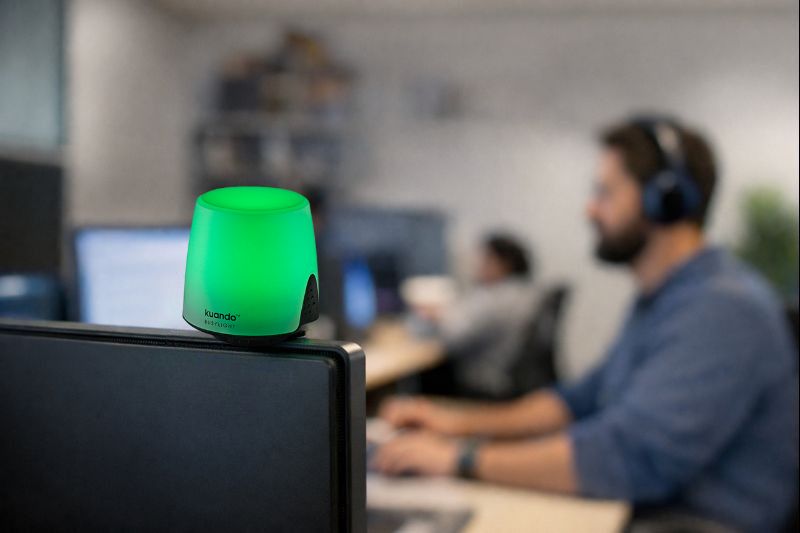
Busylight is a device that offers automatic status syncing, minimizing interruptions. This small availability light helps people work with fewer distractions by displaying status through color. Coworkers can see the color and instantly understand whether it is a good moment to approach or a moment to wait.
- A green light means they’re free to talk.
- Red signals that they’re in a meeting or concentrating and shouldn’t be interrupted.
- Yellow lets others know they’ve stepped away for a moment.
- A blue light can be set for whatever the team needs, whether that’s focus time or a specific alert.
The built-in ringer ensures that calls and meeting notifications never slip by unnoticed. Even when speakers are muted or a headset is not worn, the ringer delivers a clear audio alert supported by the visual cue, ensuring no time is lost due to missed calls or delayed responses.
Busylight ties into the communication tools people already rely on, including Microsoft Teams, Zoom, Skype for Business, and other supported UC platforms. Once connected, it automatically reads the user’s status, allowing the colors to change without manual adjustment.
How Busylight Supports IT Teams
From an IT perspective, a tool must be easy to deploy, easy to manage at scale, and compliant with internal policies and regulations. Busylight installs quickly via USB or wireless setup, requires no complicated configuration, and remains stable across system updates.
- IT staff can deploy this plug-and-play solution without heavy configuration. They can ensure policies remain intact, user privileges stay clean, and installations follow a predictable pattern without hidden settings buried across different systems.
- Since the device integrates directly with existing communication platforms rather than creating yet another communication stream, IT teams can easily manage large rollouts.
- Busylight also enables centralized management; IT teams no longer need to navigate additional permissions or maintain separate software ecosystems.
Simplifying Workplace Communication with Busylight
Workplaces depend on clear communication, yet most teams still struggle with too many tools fighting for attention. In environments like this, people need a simple cue that cuts through the noise without forcing them to adopt another app or memorize another workflow.
That’s precisely what Busylight does. It provides every employee with a visible status signal that anyone can view at a glance. Since there is no heavy configuration and no extra portal for IT to maintain, it keeps management clean and predictable while maintaining productivity levels.
If you are looking for a practical and straightforward solution to communication issues, then deploying a solution like Busylight can lead to several benefits. It can lighten the load, enable deep concentration, and give teams a straightforward way of communicating without being dependent on another app.
Explore the amazing features of Busylight today!
FAQs
Is it easy for IT teams to deploy Busylight throughout the company?
Yes. Busylight is a plug-and-play device and installs quickly without disrupting existing policies.
Is Busylight compatible with different communication tools?
Yes. Busylight works with Teams, Zoom, Skype for Business, and other supported UC platforms.
Does Busylight contribute to a quieter working environment?
Yes. The visual cues and ringer replace the need for external speakers, helping reduce noise.

Leave a Reply