Open-plan offices help teams collaborate and exchange ideas easily. Conversations flow between desks, and teams often work in a shared, energetic environment.
However, the same openness can create challenges. Background conversations, keyboard noise, and constant activity can make it easy to miss incoming call alerts on laptops and UC platforms.
In many workplaces today, calls arrive through communication tools like Microsoft Teams, Zoom, Slack and others. If employees step away from their desks or get absorbed in work, these alerts can go unnoticed.
Read on to learn how Busylight Omega solves this problem by providing clear visual call alerts across the workspace.
Why Calls Get Missed
In open-plan environments, subtle laptop alerts can easily get lost in everyday office activity. Employees may not always be looking at their screens, and background noise can mask notification sounds.
Here are some common reasons why important calls get missed:
Noise drowns laptop call alerts
Open offices are often filled with conversations, keyboard sounds, and movement. Incoming call tones from UC platforms can blend into this background noise and go unnoticed.
Constant distractions reduce focus
Employees frequently shift attention between tasks, conversations, and notifications. These distractions make it easy to overlook incoming call alerts.
Screen notifications are easy to miss
Laptop notifications are often small and visible only when someone is looking directly at the screen. If an employee steps away or turns away from their desk, they may miss the alert completely.
Desk clutter and workspace layout
Documents, devices, and accessories crowd many desks. With multiple items on the workspace, subtle alerts from a laptop can easily be overlooked.
How Busylight Omega Fixes Open Plan Office Challenges
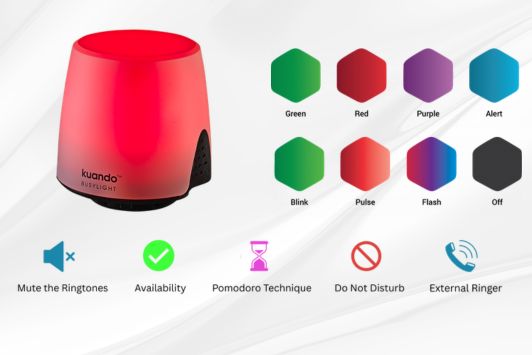
Busylight Omega provides a clear visual signal whenever a call or meeting alert appears on the user’s laptop. A bright LED light pulses visibly, ensuring the alert can be seen even if the employee is not looking at the screen.
The device plugs directly into a PC or laptop, can be mounted on desks or cubicles, and integrates easily with collaboration platforms like Microsoft Teams, Zoom, Slack, and others.
Top Features
Bright 360-degree LED alerts
The ring light pulses clearly for incoming calls and notifications. With a visible 360-degree design, alerts can be seen from across the workspace, ensuring no important call is missed.
Customizable sound alerts
The built-in speaker offers multiple tone options. Employees can choose a soft alert that stands out without disturbing the office environment.
Color-coded status indicator
Busylight Omega displays the user’s real-time availability using color-coded signals. Colleagues can instantly see whether someone is busy, available, or in a call before approaching their desk.
Focus timer
The built-in timer function allows employees to signal focused work time, helping reduce unnecessary interruptions.
Integrated audio device
The device can also function as an external audio output, allowing incoming call alerts to play through the Busylight speaker.
Benefits for Teams
Busylight Omega helps teams respond faster and communicate more effectively.
Key benefits include:
• Faster response to incoming customer or internal calls
• Reduced stress caused by missed notifications
• Improved focus and fewer unnecessary interruptions
• Better collaboration as colleagues can easily understand availability
• Greater productivity across open office environments
Setup and Best Practices
Busylight Omega is simple to deploy and can be set up in minutes.
• Plug the device into a USB port on a PC or laptop
• Mount it on the top edge of a monitor or desk for maximum visibility
• Connect communication apps through the Kuando Hub software
• Test call alerts and status indicators regularly
• Ensure the team understands the color codes used for availability
Strengthen Focus and Reduce Workplace Interruptions with Busylight Omega
If you’re looking to improve workplace communication and reduce missed calls, Busylight Omega offers a simple and effective solution.
The device uses bright, color-coded visual signals that sync with your communication platform, ensuring employees never miss an important call or meeting alert. Whether someone is busy, on a call, focusing, or available, Busylight Omega clearly communicates their status and helps create a more productive office environment.
FAQs
Why are calls difficult to notice in open offices?
In open-plan offices, background conversations, movement, and distractions can make it easy to miss laptop notifications or incoming call alerts.
How does Busylight Omega help prevent missed calls?
Busylight Omega uses bright visual LED alerts that signal incoming calls and status updates, making them visible even if the employee is not looking at their screen.
Does Busylight Omega work with Teams and Zoom?
Yes. Busylight Omega integrates with platforms like Microsoft Teams and Zoom through the Kuando Hub software.

Leave a Reply